Translate with OpenAI ChatGPT
OpenAI offers powerful language models like GPT-4.1 that produce fluent, natural-sounding translations. It is one of the most widely used AI providers and a great default choice for translating your App Store screenshots.
Prerequisites
- A ButterKit Pro license
- An OpenAI API key (create one at platform.openai.com/api-keys)
Connect OpenAI to ButterKit
Open Settings
In ButterKit, go to Settings > Models.
Add a new model
Click the + button to add a new cloud model.
Enter your model details
Fill in the following fields:
| Field | Value |
|---|---|
| Description | OpenAI (or any label you prefer) |
| URL | https://api.openai.com |
| API Key | Your OpenAI API key |
| Model | gpt-4.1 (recommended) |
| API Key Header | Leave blank (auto-detected) |
| Temperature | 0.35 |
Temperature controls randomness: lower values (0.0-0.3) produce more literal translations, while higher values (0.4-0.7) allow light paraphrasing. We recommend
0.35as a good starting point. Some endpoints may clamp or ignore this value.
Security: Your API key is stored securely in the macOS Keychain. It is never sent to ButterKit servers or any third party other than the provider you configure.
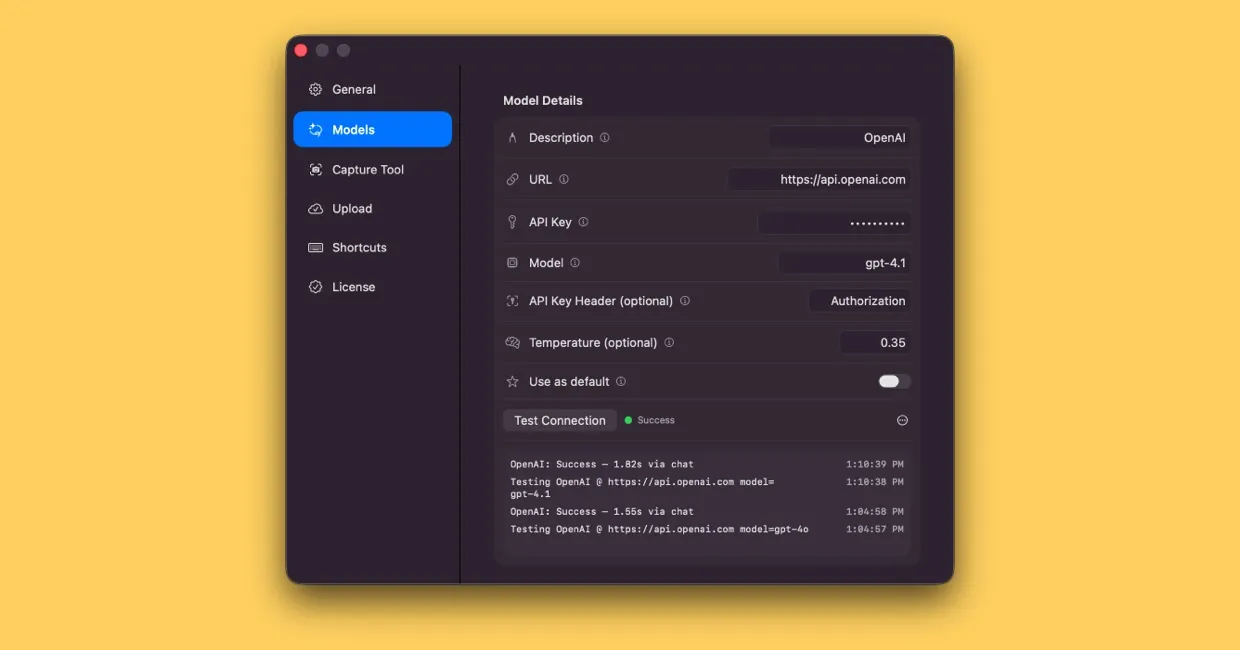
A successful connection between OpenAI and ButterKit on macOS
Test the connection
Click Test Connection to verify that ButterKit can reach OpenAI with your key. You should see a success confirmation.
Start translating
Toggle Use as default if you want OpenAI for all translations, or select it from the Translate with dropdown when adding a localization.
Available Models
| Model | Best for | Relative cost |
|---|---|---|
gpt-4.1 | Recommended default; strong instruction following and translation quality | Medium |
gpt-4.1-mini | Matches or exceeds gpt-4o quality at lower cost and latency | Low |
gpt-4.1-nano | Fastest and cheapest; good for simple, high-volume translations | Very low |
gpt-4o | Proven general-purpose model; still widely used | Medium |
gpt-4o-mini | Budget-friendly alternative with solid quality | Low |
Recommended Settings
gpt-4.1 is the recommended default. It offers strong instruction following and translation quality with support for up to 1 million tokens of context.
For high-volume bulk translation where cost matters more than nuance, gpt-4.1-mini or gpt-4.1-nano are excellent choices.
Billing
You are billed directly by OpenAI based on token usage. ButterKit does not add any markup. Monitor your usage at platform.openai.com/usage.
Quick Help
- Need more help? Browse the Documentation
- Check out our Templates & Add-ons
- Join us on Discord for quick help
- Any other questions? Get in touch